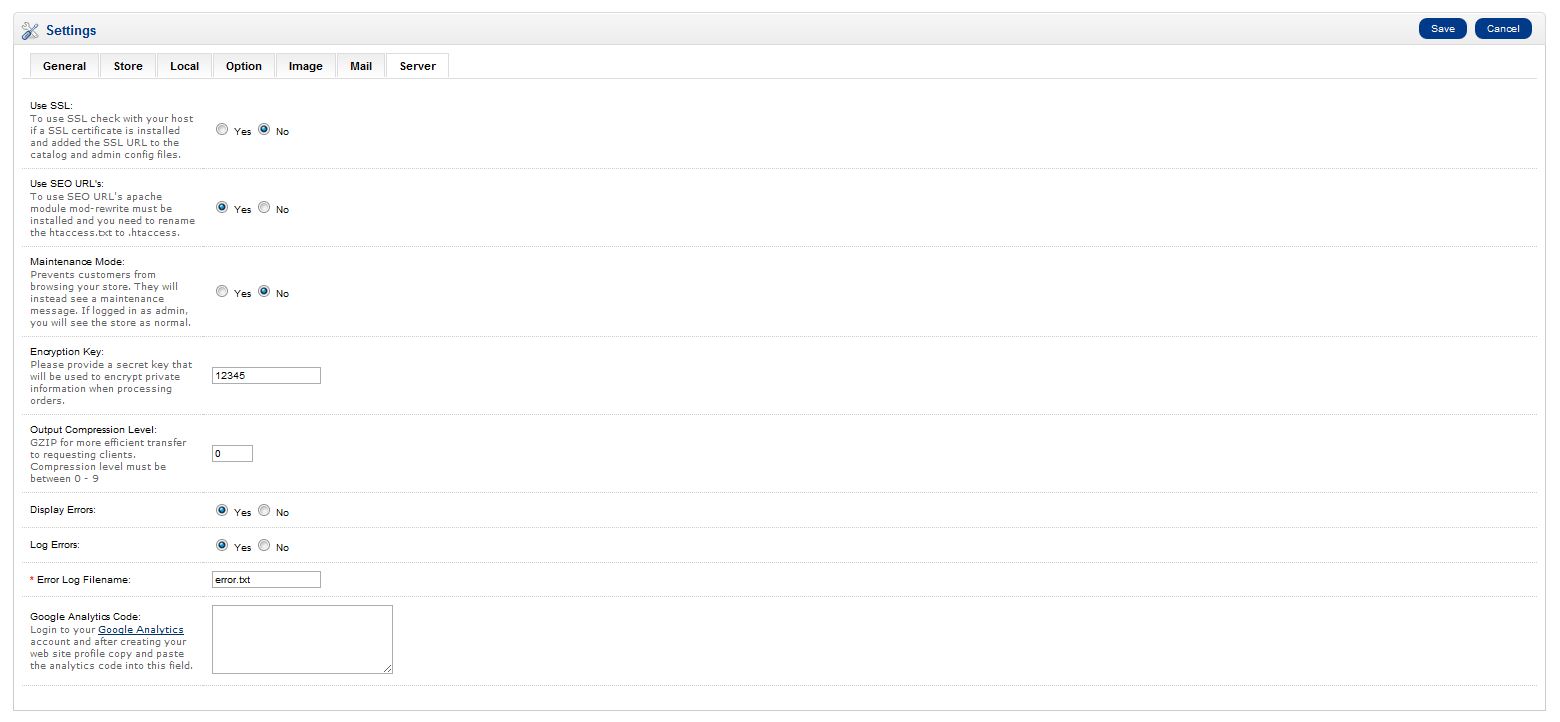
- Once you have your Google Analytics code log into your OpenCart Dashboard
- Go to System > Settings
- Choose your store and click “edit”
- Go to the server tab and scroll to the bottom
- Find the Category for Google Analytics Code and paste your code in the text box If you are not familiar how to get your Google Analytics code please see our article on Installing Google Analytics
Thursday, February 27, 2014
Adding the Google Analytics code to OpenCart
Wednesday, February 26, 2014
change opencart order email content as our wish
You can modify the content by editing the following template file:
/catalog/view/theme/default/template/mail/order.tpl
(assuming that you are using the default template)
But if you want to modify the subject and other stuff, you'll need to edit the order Model file:
/catalog/model/checkout/order.php
then find
$mail->setSubject($subject);
and set the $subject to whatever you want :)
sends the same email to the admin as the customer 1.5.x work more like 1.4.x
Do the following....
(1.5.x ONLY!)
1. EDIT: catalog/model/checkout/order.php
2. FIND (~LINES 475 - 488) (Be sure its under the "// Admin Alert Mail" line)
3. REPLACE WITH:
(1.5.x ONLY!)
1. EDIT: catalog/model/checkout/order.php
2. FIND (~LINES 475 - 488) (Be sure its under the "// Admin Alert Mail" line)
- CODE: SELECT ALL
$mail = new Mail();
$mail->protocol = $this->config->get('config_mail_protocol');
$mail->parameter = $this->config->get('config_mail_parameter');
$mail->hostname = $this->config->get('config_smtp_host');
$mail->username = $this->config->get('config_smtp_username');
$mail->password = $this->config->get('config_smtp_password');
$mail->port = $this->config->get('config_smtp_port');
$mail->timeout = $this->config->get('config_smtp_timeout');
$mail->setTo($this->config->get('config_email'));
$mail->setFrom($this->config->get('config_email'));
$mail->setSender($order_info['store_name']);
$mail->setSubject($subject);
$mail->setText($text);
$mail->send();
3. REPLACE WITH:
- CODE: SELECT ALL
// HTML
$template->data['text_greeting'] = $language->get('text_new_received') . "\n\n";
$template->data['invoice_no'] = '';
$template->data['text_invoice_no'] = '';
if (file_exists(DIR_TEMPLATE . $this->config->get('config_template') . '/template/mail/order.tpl')) {
$html = $template->fetch($this->config->get('config_template') . '/template/mail/order.tpl');
} else {
$html = $template->fetch('default/template/mail/order.tpl');
}
$subject = sprintf($language->get('text_new_subject'), html_entity_decode($this->config->get('config_name'), ENT_QUOTES, 'UTF-8'), $order_id . ' (' . $order_total . ')');
$mail->setSubject($subject);
$mail->setTo($this->config->get('config_email'));
$mail->setHtml($html);
$mail->send();
opencart 1.5.6 Additional Product Images Not Working - Solution
It is an issue of opencart new feature openbay.
Edit admin\view\template\extension\openbay_links.tpl
Replace
id="images"
with
id="openbay_images"
ie openbay_links.tpl file Should be in given format
<div id="tab-openbay" style="display:none;">
<table class="list" id="openbay_images">
<thead>
<tr>
<td class="left"><?php echo $lang_marketplace; ?></td>
<td class="center"><?php echo $lang_status; ?></td>
<td class="right"><?php echo $lang_option; ?></td>
</tr>
</thead>
<tfoot>
<?php foreach ($markets as $market) { ?>
<tr>
<td class="left"><?php echo $market['name']; ?></td>
<td class="center"><img style="display:inline; position:relative; top:3px;" src="view/image/<?php if($market['status'] == 1){echo'success';}else{echo'delete';} ?>.png" /></td>
<td class="right">
<?php if($market['href'] != ''){ ?>
<a href="<?php echo $market['href']; ?>"<?php if($market['target'] != ''){ echo' target="'.$market['target'].'"'; } ?>><?php echo $market['text']; ?></a>
<?php }else{ ?>
<?php echo $market['text']; ?>
<?php } ?>
</td>
<?php } ?>
</tfoot>
</table>
</div>
Remove help link from admin
you can remove the below code from FTP
/admin/view/template/common/header.tplYou can remove
<li id="help"><a class="top"><?php echo $text_help; ?></a>
<ul>
<li><a href="http://www.opencart.com" target="_blank"><?php echo $text_opencart; ?></a></li>
<li><a href="http://www.opencart.com/index.php?route=documentation/introduction" target="_blank"><?php echo $text_documentation; ?></a></li>
<li><a href="http://forum.opencart.com" target="_blank"><?php echo $text_support; ?></a></li>
</ul>
</li>
change order_id for Invoice number opencart
save the code to magic.php
<?php
include ("config.php");
$link = mysql_connect(DB_HOSTNAME, DB_USERNAME, DB_PASSWORD);
if (!$link) {
die('Could not connect: ' . mysql_error());
}
else {
mysql_select_db(DB_DATABASE);
}
$magic_table = DB_PREFIX . "order";
$magic = $_POST['magic'];
if ($magic!==""){
$query="ALTER TABLE `$magic_table` AUTO_INCREMENT = $magic";
mysql_query($query);
}
$query = "SELECT Auto_increment FROM information_schema.tables WHERE table_name='$magic_table' AND table_schema = DATABASE()";
$result = mysql_query($query);
$row = mysql_fetch_row($result);
$magic = $row[0];
?>
<html><head><title>HelderIM : OpenCart : (Re)set ordernumber</title></head><body>
<h1>(Re)set Ordernumber (by HelderIM)</h1>
<p>
This tool reads the next ordernumber that will be generated. You can change the ordernumber by entering a new number and press "SET". It does not change ordernumbers already generated.
</p>
<p>
This tool is tested on OpenCart 1.5.2.1 using MySQL.<br>
Delete this tool from your website after usage. It has no protection whatsoever!!!!
</p>
<?php
echo '<form name="EQ" action="magic.php" method="post">';
echo "<input name='magic' type='text' value='". $magic . "'/><br>";
echo "<input type='submit' value='SET'/></form>";
echo "</body></html>";
?>
upload it to your store ftp
then goto
yourstore.com/magic
There you can enter your starting number
<?php
include ("config.php");
$link = mysql_connect(DB_HOSTNAME, DB_USERNAME, DB_PASSWORD);
if (!$link) {
die('Could not connect: ' . mysql_error());
}
else {
mysql_select_db(DB_DATABASE);
}
$magic_table = DB_PREFIX . "order";
$magic = $_POST['magic'];
if ($magic!==""){
$query="ALTER TABLE `$magic_table` AUTO_INCREMENT = $magic";
mysql_query($query);
}
$query = "SELECT Auto_increment FROM information_schema.tables WHERE table_name='$magic_table' AND table_schema = DATABASE()";
$result = mysql_query($query);
$row = mysql_fetch_row($result);
$magic = $row[0];
?>
<html><head><title>HelderIM : OpenCart : (Re)set ordernumber</title></head><body>
<h1>(Re)set Ordernumber (by HelderIM)</h1>
<p>
This tool reads the next ordernumber that will be generated. You can change the ordernumber by entering a new number and press "SET". It does not change ordernumbers already generated.
</p>
<p>
This tool is tested on OpenCart 1.5.2.1 using MySQL.<br>
Delete this tool from your website after usage. It has no protection whatsoever!!!!
</p>
<?php
echo '<form name="EQ" action="magic.php" method="post">';
echo "<input name='magic' type='text' value='". $magic . "'/><br>";
echo "<input type='submit' value='SET'/></form>";
echo "</body></html>";
?>
upload it to your store ftp
then goto
yourstore.com/magic
There you can enter your starting number
Removing "Powered By Open Cart" from emails footer
just change to your side easy , no need delete any text .
GO to : catalog/language/english/mail/
find " open cart , than change to your site name , then done .
OR
find
$_['text_powered']
in
catalog/language/english/common/footer.php
find
$_['text_new_powered']
in
catalog/language/english/mail/order.php
and change it.
to change the size and font go to
catalog/view/theme/yourtemplate/stylesheet/stylesheet.css
find #powered
Subscribe to:
Posts (Atom)